Catalog
- Attribute Template
- Categories
- Digital Downloads
- To Use Digital Downloads
- Install Digital Downloads Module
- Set Up a CDN
- Connect Your Miva Merchant Store to Your CDN
- Global Defaults for Store's Digital Downloads
- See Downloaded Digital Products
- Manually Create a Download URL
- Add Digital Products One at a Time
- Disable Off-Line Payment Methods for Digital Products
- Customer Experience - Buying Digital Products
- Facet Rules
- Inventory
- Inventory Management
- Products
- Delete a Product
- Create a New Product
- Images
- Related Products
- Attributes
- Inventory Kit Builder
- Inventory Variants
- SEO
- Categories
- Price Groups
- Upsold Products
- Inventory
- Gift Certificate Sales
- URIs
- Digital Download Settings
- Digital Downloads
- Custom Fields
- Marketplace - eBay Product Listings
- Marketplace - eBay Listing Settings
- Marketplace - Amazon Product Listings
- Marketplace - Etsy Product Listings
- Marketplace - Etsy Listing Settings
- Edit Product
Categories
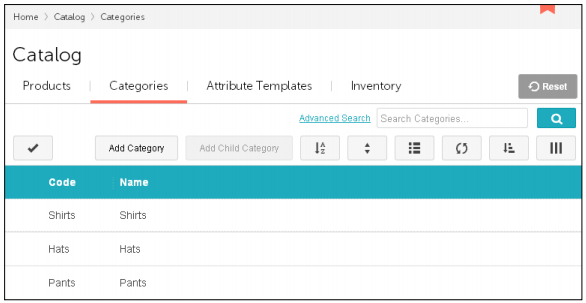
Use the Categories tab to create categories that organize your products into logical groups, and to add products to specific categories. You can also do both of these activities from the Catalog > Edit Product > Categories Tab.
Technically, you don't have to assign a product to a category. Customers would still be able to find the product by clicking on "All Products" or by searching for a general term, like "hat". However, putting your products in categories makes it easier for customers to browse your store and find the products that they want. Categories in your on-line store are like departments in a brick and mortar store.
- You can create as many categories as you wish
- Categories can contain child categories, which can have their own child categories …etc.
- The same product can be assigned to as many categories as you wish.
|
Sort the Categories as they appear in the admin interface. See also Sorting Records. |
|
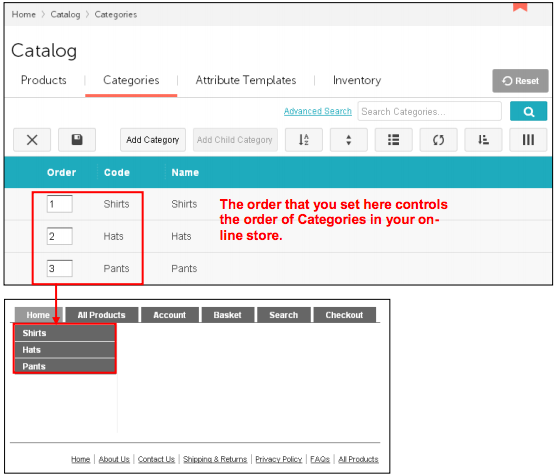
Edit the Display Order. Change the way that categories are shown in your on-line
store. See also Sorting Records.
|
|
Show Categories. You can choose to show all of the categories that you've created,
or just the active ones. Inactive categories still exist in your store, but are not shown
to customers. To set a category as active/inactive use the:
 > Catalog > Categories tab > Edit a Category > Category tab > Details
section > Active checkbox. |
 |
Refresh the screen. |
|
Sort. Please see Sorting Records. |
|
Show or hide columns in the admin interface. |