General Information
Page Titles
A page title is an HTML tag that is embedded in the HTML of your on-line store pages. Every page in your on-line store has a page title, and most browsers display the page title somewhere in the browser window.
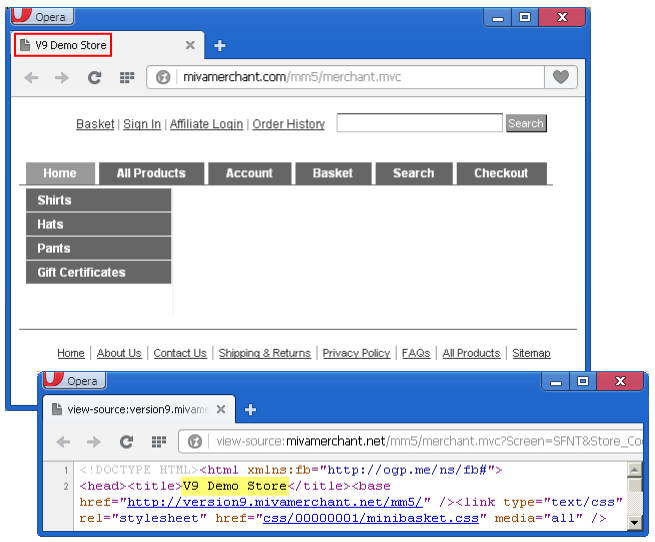
By default, Miva Merchant automatically creates a page title for every page in your on-line store that looks like this:
<some extension> - <store name>
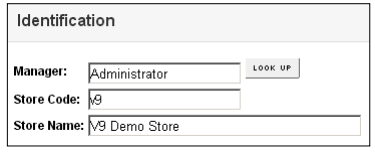
Miva Merchant gets your store name from the:
 > Store Settings > Store Details tab > Identification section > Store Name field.
If you look at your storefront page (SFNT), the page title is just the store name:

On a category page, the default page title is

On a product page, the default page title is

In Miva Merchant version 9.0004 and later, you can change the page title tags:
- As a default for your entire store
- At the page level
- For specific categories and products
To Change the Default Page Title for Your Entire Store
By default, Miva Merchant uses your store name in the page title for every page of your on-line store. To change the default page title for your entire store, you must change your store's name.
- Go to Store Settings > Store Details tab > Identification section > Store Name field
- Change the Store Name Field.
- Click Update.
To Change the Page Title for a Page
- Go to > User Interface > Pages tab > edit a page > SEO tab > Title section.
- Enter a new value in the Title field, then click Update.
To Change the Page Title for a Specific Category
- Go to > Catalog > Categories tab > edit a category > SEO tab > Title section.
- Enter a new value in the Title field, then click Update.
To Change the Page Title for a Specific Product
- Go to > Catalog > Products tab > edit a product > SEO tab > Title section.
- Enter a new value in the Title field, then click Update.