Shipping
Base + Weight Shipping
Use Base + Weight Shipping to generate simple shipping charges based on the weight of the order. See also:
-
 > Store Settings > Store Details tab > Settings section > Weight Units drop-down list, to set
the unit of weight used in your store.
- Comparing Weight Based Shipping Modules
To Enable Base + Weight Shipping
- Go to > Shipping > Add / Remove Modules.
- In the Available Modules section, click on the Install button under Base + Weight Shipping.
To Configure Base + Weight Shipping
- In the Base + Weight Shipping tab, click on Add Method
 .
- Click Save Method

1.1. Enter a name for the shipping method. This name will appear in your on-line store.
1.2. Enter a Base Charge. The base charge is like a flat rate that you are always going to charge. for this type of shipping. The base charge is added to the calculated weight charge.
1.3. Enter an Amount/Weight Unit. This is the price that you want to charge per weight unit
(usually pounds or kilograms) of the order. You can set the weight unit in the >
Store Settings > Store Details tab > Settings section > Weight Units drop-down list.
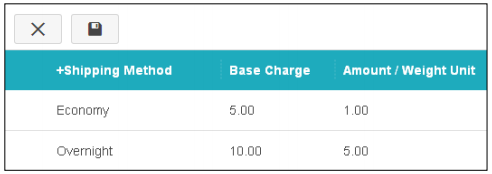
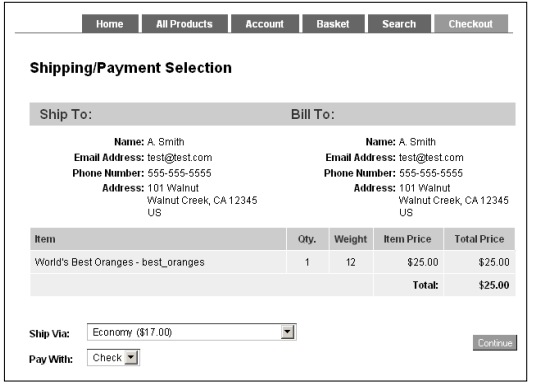
In our example we created two shipping methods: Economy and Overnight. Let's say our customer selects Economy shipping, which has a base charge of $5.00 and a shipping charge of $1.00 per pound. If our customer buys a bag of oranges that weighs 12 pounds, the shipping charge is:
| Base Charge: | $5.00 |
| Amount/Weight Unit x Weight of Order: | ($1.00 per pound x 12 pounds) $12.00 |
| Shipping: | $17.00 |