An external system downloads orders from a queue with two JSON API functions from the Order Workflow module:
| Function | Does |
|---|---|
QueueOrderList_Load_Query |
Returns the orders in a queue, with the same filters, sorting and on-demand columns as OrderList_Load_Query. Fires the Order Retrieved trigger for each order returned. |
OrderList_Acknowledge |
Confirms the external system saved the orders. Fires the Order Acknowledged trigger for each one. |
Neither function changes a queue by itself. The workflows on those triggers decide what happens to each order, which is why the default workflows come in two sets.
Calling the functions#
Both are module functions. Send "Function": "Module", the module code and the function name:
{
    "Store_Code": "{{Store_Code}}",
    "Miva_Request_Timestamp": "{{$timestamp}}",
    "Function": "Module",
    "Module_Code": "orderworkflow",
    "Module_Function": "QueueOrderList_Load_Query",
    "Queue_Code": "new_and_updated",
    "Count": 50,
    "Offset": 0,
    "Filter": [
        {
            "name": "ondemandcolumns",
            "value": ["customer", "items", "charges", "discounts", "payments", "notes", "CustomField_Values:customfields:*"]
        }
    ]
}
The API token needs each function assigned in this format, and the order view permission:
Module:orderworkflow:QueueOrderList_Load_Query
Module:orderworkflow:OrderList_Acknowledge
Only these two functions can be called with an API token. The module’s other functions, which create and edit workflows, queues and credentials, work only inside the admin. To set those up outside the admin, use provisioning.
With acknowledgement (recommended)#
The order stays in New & Updated Orders until the external system confirms it saved it. If a download fails partway, the orders are still in the queue next time.
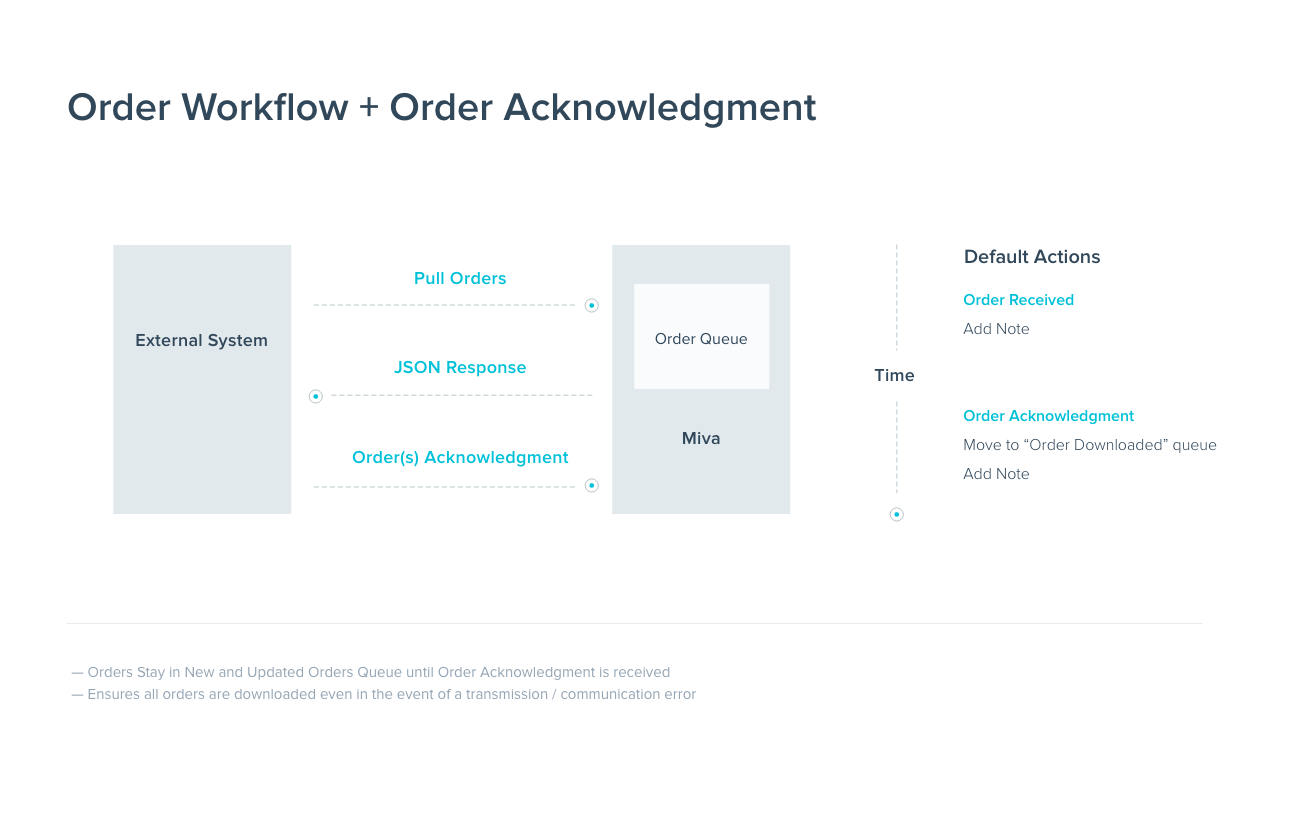
Enable these default workflows:
- Process New & Updated Orders, which puts paid orders into New & Updated Orders.
- Process Retrieved Orders with Order Acknowledgement, which adds a note when an order is downloaded and leaves it in the queue.
- Process Order Acknowledgement, which moves acknowledged orders to Successfully Retrieved Orders.
The external system then:
- Calls
QueueOrderList_Load_Queryfornew_and_updated. - Saves each order.
-
Calls
OrderList_Acknowledgewith the IDs it saved:{ "Store_Code": "{{Store_Code}}", "Miva_Request_Timestamp": "{{$timestamp}}", "Function": "Module", "Module_Code": "orderworkflow", "Module_Function": "OrderList_Acknowledge", "Order_IDs": [1001, 1002] } -
Repeats until the queue is empty.
Changed orders come back too: an order that’s updated after it was acknowledged goes back into New & Updated Orders through the first workflow’s Order Total Change and Order Item triggers.
Without acknowledgement#
Orders leave the queue as soon as they’re downloaded. It’s simpler, but an order is lost from the queue if the external system fails after the download.
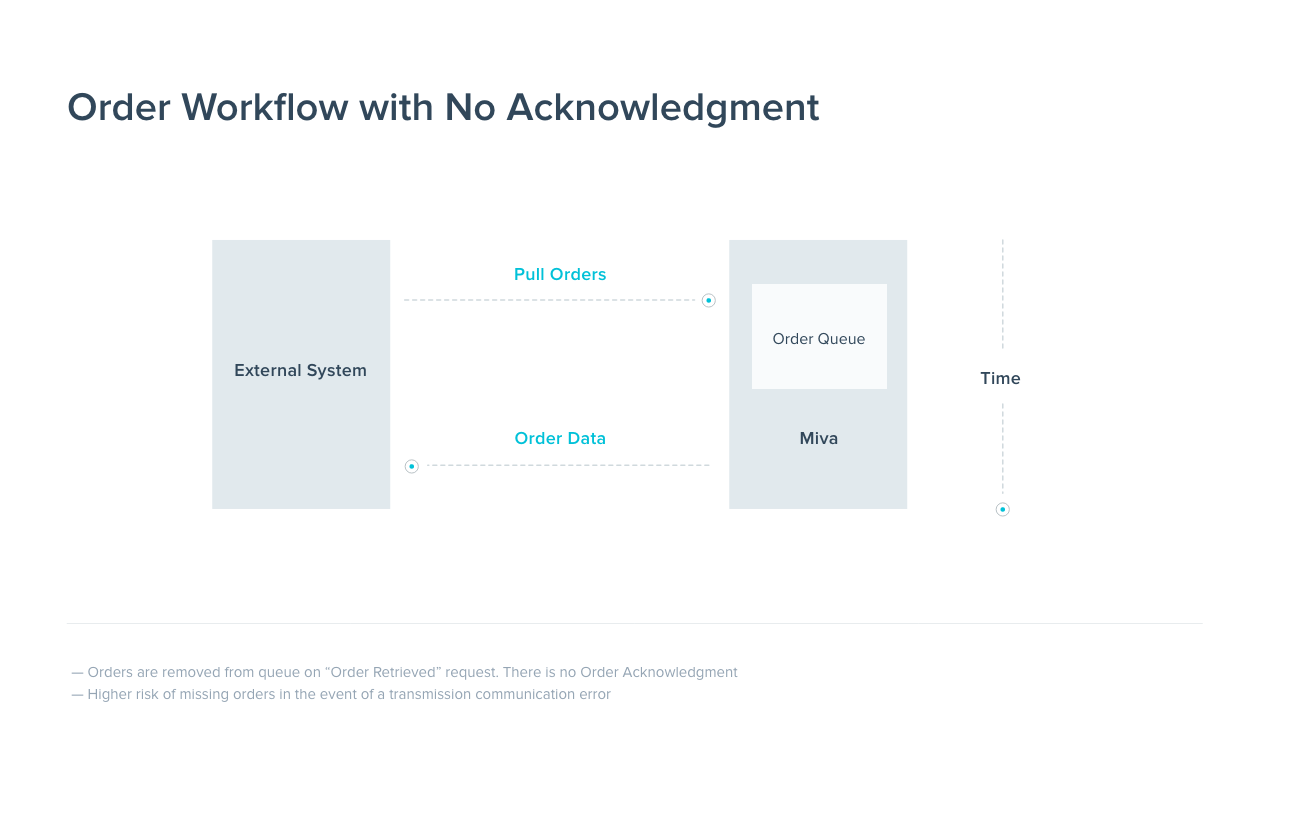
Enable Process New & Updated Orders and Process Retrieved Orders, then edit Process Retrieved Orders and change its action from Add to Queue to Move to Queue. As installed it uses Add to Queue, so retrieved orders would stay in New & Updated Orders as well.
The external system only calls QueueOrderList_Load_Query.
Paging through a queue#
Use Count and Offset as with any list function. Orders leave the queue as they’re acknowledged (or, without acknowledgement, as they’re retrieved), so the simplest loop is: request a page at Offset 0, save and acknowledge it, and request Offset 0 again until total_count is 0. If you acknowledge only at the end, increase Offset by Count for each page instead.
OrderList_Acknowledge responses#
processedis the number of order IDs handled. It can be less than the number sent: the function stops after about 60 seconds, so send IDs in batches.- An ID that doesn’t match an order comes back as a warning,
MER-UTIL-ORWF-00180“Order not found”, and the other IDs are still processed. - With no enabled Order Acknowledged workflow, the function does nothing to the orders but still reports
processed.
Related#
- Order integration guide: other ways to get orders out, such as webhooks and pulling by date
- Webhooks: push orders instead of pulling them